Presto L2 Dashboard
Dashboard is your go-to place to manage and review all the information about your L2.
Top to bottom it consist of:
- name of the L2 and its type
- “gear” menu with options to delete the L2 (How To Delete A Rollup)
- navigation strip
- rootchain, location, status and zkEVM logo
- sections
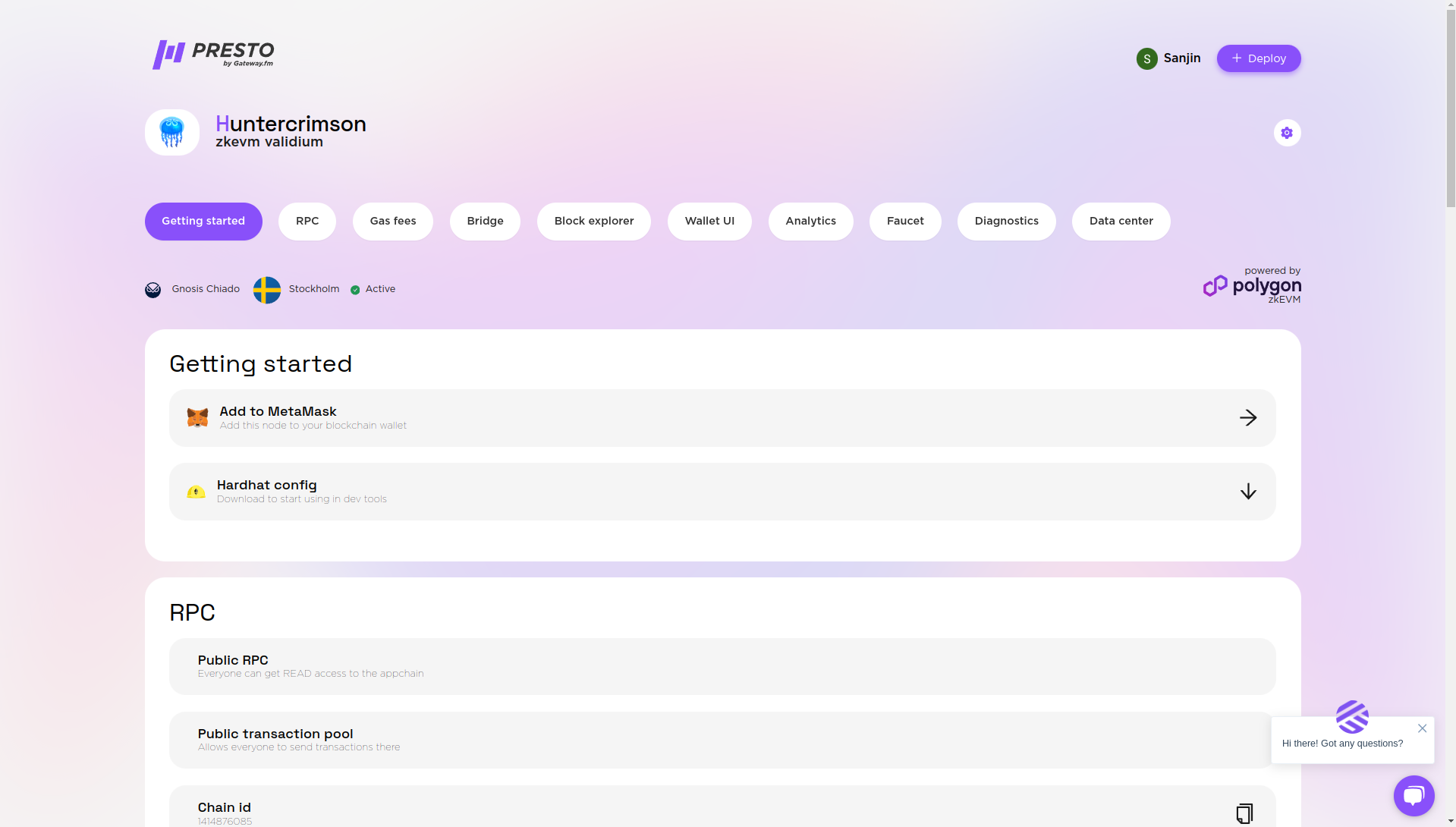
Getting Started
Here you can add your chain to a wallet (How to use MetaMask with Presto) and also download the config for Hardhat to deploy smart contracts (How to use HardHat with Presto).

RPC
Here is all the necessary info about the RPC, is it public or private, chain id and the RPC url.

Gas Fees
Here is the overview and settings for the gas fees.

Bridge
Here is the link to the UI (and visibility settings) for the LX-to-LY bridge from Polygon CDK. (See How to use a Bridge).

Block Explorer
Each rollup comes with the blockscout instance. (See How to use a Block Explorer).

Faucet
Each testnet comes with a faucet where you can get test gas tokens for smart contract deployments.

Diagnostics
This section contains information about smart contracts on L1.

Data center info
basic info about the datacenter
.png)
Enterprise customers
Enterprise customers might have extra sections or other set of sections dependent on what customizations are chosen. See (Enterprise vs Paid — what is the difference?).